



Editing your profile and modifying your password


Any registered user or data provider can edit its profile. User profile contains information like first name, last name, email and phone number.
User can modify their profile and their password from the portal of the platform: http://portal.ingeoclouds.eu
A user must be authenticated to edit its profile.
Editing your profile:
Click on the "Edit profile" button located on top right of the page.

A frame allows you to edit your profile
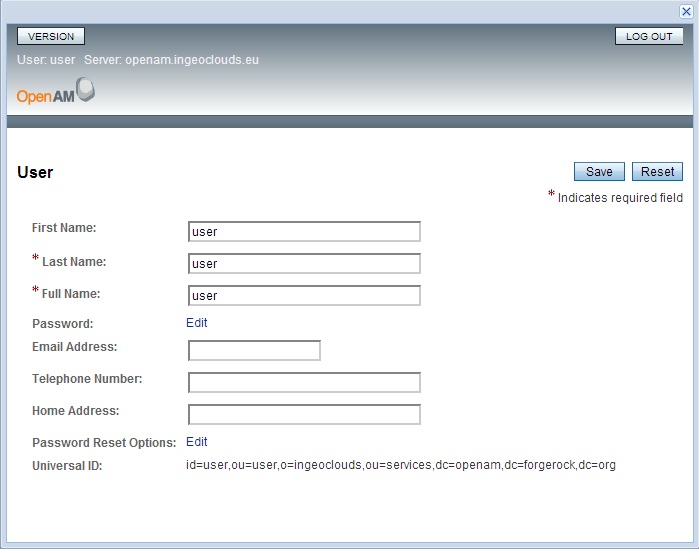
Modify your information and click on "Save".
Modifying your password:
Edit your profile as explained above. In the "Edit profile" frame, click on the "Edit Password" link.
A new tab (or window) in the browser allows you to modify your password
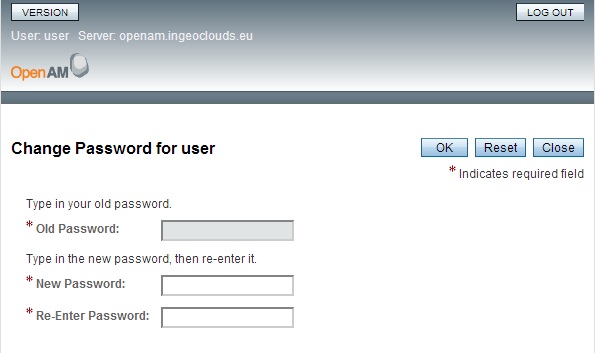
Leave the "Old Password" field as it is disabled.
Enter your new password twice and click on "OK". Don't forget to close the tab (or window)
- Log in to post comments
Last updates
Project's Calendar

Only for consortium members
Contact: you can contact the Consortium using the generic address: contact [@] ingeoclouds.eu. Thanks!
This project is partially funded by the European Commission CIP Program. This website reflects the views of the authors only, and the Commission cannot be held responsible for any use which may be made of the information contained therein.

InGeoCloudS Users Documentation and other documents of this Web
site by the InGeoCloudS consortium members
are licensed under a Creative Commons Attribution-NonCommercial-ShareAlike 3.0 Unported License.
Based on a work at http://www.ingeoclouds.eu/.
Ad banners and pictures are (c) AKKA Technologies